
Using MCP for App Settings in Agentic Engineering | How an Agent Changes the App Config
How an AI agent manages a deployed app’s configuration in agentic engineering — name, description, SEO, PWA and languages changed by a plain request and applied on the next page load, with no rebuild. The App Config MCP connector explained.
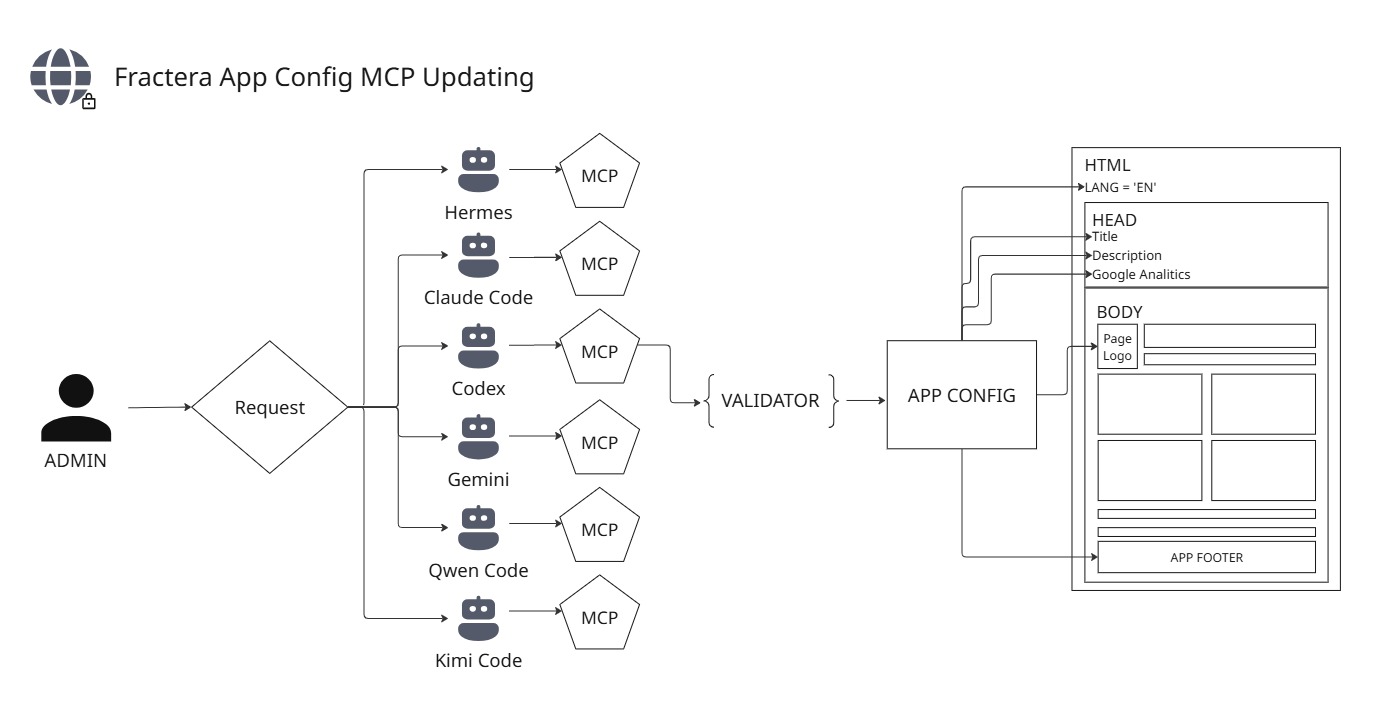
“Change your site’s name, description, or SEO — even its languages — just by asking an AI agent, in chat or by voice. No admin panel to click through. No rebuild to wait for.”
Fractera is an Agentic Engineering Infrastructure: a secure, self-hosted workspace where AI models write and run your application on your own server. This guide explains, plainly, one piece of it — configuration automation in agentic engineering: how an agent changes what your app says about itself, why the change is safe, and how it reaches visitors instantly. It is written to be read by a technical human and by an AI agent alike.
What we automated: project settings by an agent’s voice
Before, to change the site name, description, SEO or an icon, you opened the admin panel and clicked through fields. Now you do the same thing by simply asking an AI agent in words — in chat or by voice. The agent finds the right field, checks the value, and writes it. And the change shows up on your site on the next page load, with no full rebuild.
Where the settings live — a simple model
Picture a single plain text file, `app/APP-CONFIG/app-config.json` — the passport of your site:
{
  "name": "Fractera",
  "description": "Production-Coding AI Server ...",
  "url": "https://fractera.ai",
  "seo": { "titleTemplate": "%s | Fractera" },
  "jsonLd": { "organization": false }
}
Why a file — and not a database or environment variables:
- A file is transparent — the agent can read it as-is, no database query needed.
- It holds nested structure (`seo.*`, `jsonLd.*`, `geo.*`) — flat env variables cannot.
- It applies with no rebuild — env variables do need one, which is exactly why languages live there (more below).
Editing the file by hand is risky — one broken brace and the site falls over. So a change never goes in raw: it goes through a validated setter (a smart writer) that checks the value against a catalog and writes it cleanly and atomically. The file is *where the bytes live*; the setter is *how they are written* — and only the setter writes.
How it works under the hood: a five-step flow
You (chat/voice): "change the description to 'Acme Corp'"
        |
        v
The agent calls the MCP tool on :3218  ->  set_text_value { path:"description", value:"Acme Corp" }
        |
        v
The setter checks (field exists? type ok?) and writes app-config.json  (atomic -- no risk of corruption)
        |
        v
The setter pings /api/revalidate  <-- the piece added so the change is instant
        |
        v
The site drops the page cache -> on the next load the new description is visibleThe tools every agent now has
Tool                            What it does
──────────────────────────────  ─────────────────────────────────────────────────────────────
list_text_fields                Show ALL settings: path, what it means, current value, is it set
list_unfilled_fields            Show only the empty ones (so the agent can nudge you to fill them)
set_text_value { path, value }  Change one field (validate + write + revalidate)
list_languages / set_languages  Read / change the language set
Cases: what it looks like in practice
- Description. You: “Change the description to ‘Acme Corp’.” → `set_text_value { path:"description", value:"Acme Corp" }` → new text in the search snippet and social shares on the next load. No panel, no rebuild.
- Your own domain. You: “My domain is now example.com.” → the agent sets two fields, `url` and `seo.canonicalBase` → canonical links and OG tags follow the new domain.
- Schema for Google. You: “Turn on the Organization schema.” → `set_text_value { path:"jsonLd.organization", value:true }` → structured Organization data appears in the page HTML.
- Languages (the special case). You: “Add French.” → `set_languages(["en","ru","fr"])` → written to env, and the agent answers honestly: “French appears after a rebuild, a few minutes.” Languages decide which pages get generated — that is settled at build time, so it cannot be instant.
- Help filling things in. You: “What else should I fill in for SEO?” → `list_unfilled_fields` → “not set: keywords, Google verification, the author’s Twitter…” and the agent offers to complete them.
One capability, in all six agents of the agentic engineering workspace
A capability is only real if it survives no matter which single agent is present — a project may run just one, with no orchestrator. So the connector and the skill are duplicated into every agent:
Agent                  MCP :3218 in                   Skill manage-app-settings
─────────────────────  ─────────────────────────────  ──────────────────────────────
Claude Code            .mcp.json                      own copy in .claude/skills
Codex                  .codex/config.toml             reads .agents/skills
Gemini CLI             .gemini/settings.json          own copy in .gemini/skills
Qwen Code              .qwen/settings.json            own copy in .qwen/skills
Kimi Code              .kimi/config.toml              reads .agents/skills
Hermes (orchestrator)  its config (mcp_servers)       services/hermes-skills/manage-app-settings.md
Request flow: a single agent vs. the orchestrator
Directly on one coding agent — the real “single-agent” case, no orchestrator:
You -> Codex: "change the description to 'Acme Corp'"
  1. Codex sees the manage-app-settings skill (its description is loaded) -> knows the steps
  2. Codex connects to :3218 via .codex/config.toml (with the secret)
  3. (optional) list_text_fields -> { path:"description", current:"...", is_set:false, role:"meta description..." }
  4. set_text_value { path:"description", value:"Acme Corp" }
       -> validate -> write app-config.json (atomic) -> ping /api/revalidate
  5. response: { ok:true, path:"description", value:"Acme Corp", is_set:true }
  -> Codex: "Done -- it shows on the next page load."
Through Hermes, the orchestrator — same tools, plus coordination:
You -> Hermes: "change the description to 'Acme Corp' and turn on the Organization schema"
  1. Hermes holds the same tools in its MCP client
  2. set_text_value { path:"description", value:"Acme Corp" }
     set_text_value { path:"jsonLd.organization", value:true }
  3. Hermes gathers both results, replies once, and can chain next steps
     (verify the page, log it to memory, coordinate other agents)
The difference in one line: the write mechanics are identical — both hit the same `:3218` connector. Hermes only adds orchestration (several steps, autonomous loops, multi-agent coordination). For a single change it is not required, and a project with one lone Codex does the whole job by itself.
How an agent knows this natively
- The skill — its description is loaded into the agent’s list of skills at session start, so it knows a “manage app settings” capability exists.
- The MCP tools — the agent asks `:3218` for `tools/list`; the tools appear in its toolset with descriptions, ready to call.
- Vector memory — this document is ingested into the shared memory (LightRAG), so a memory-equipped agent recalls the deeper how and why on demand.
Even with no memory and no orchestrator, the agent still has the skill and the MCP locally — that is the whole point of self-sufficiency. Languages stay the deliberate exception: they feed static page generation, so they are build-time, and the agent says so rather than pretending the change is instant.
Security and external access in agentic engineering
Configuration is a change to the file system, so access to the connector is constrained by design, in depth:
- Identity, not just a key. Writing configuration (and the database) is restricted to the architect role, checked at every layer — the MCP connector, the HTTP config routes, and the data service. Reading can be broader; writing is architect-only.
- Network isolation. The connector listens on `127.0.0.1` only and is never exposed to the internet. The public surface sits behind nginx and the auth gate; the connector is reachable solely from inside the workspace.
- A per-deploy secret. Every call to the connector carries a secret unique to your deployment, so only your in-workspace agents can reach it.
- Confirm before changing. A writing tool restates the change (old → new) and waits for your go-ahead before it writes.
Deploy a workspace where your AI agents don’t just write the app — they retune its identity on request, safely, from your own server.
Deploy with AI
Experiment relentlessly. If you work “the way it’s done,” your ceiling is known in advance. Try to do things differently — not like everyone else.
 Roma ArmstrongFounder at Fractera.ai
Frequently asked questions
- How does an AI agent change a project setting?
- You ask it in plain words. The agent finds the right field, validates the value, and writes it through the App Config MCP connector (port 3218) — for example set_text_value with a path and a value. It reads first with list_text_fields (reading never breaks anything), confirms the change with you, then writes and triggers revalidation so the new value is live on the next page load.
- Where are the settings stored — a database, environment variables, or a file?
- A plain JSON file on disk, app/APP-CONFIG/app-config.json — think of it as your site’s passport. A file beats a database (which is opaque to an agent and needs a query layer) and env vars (flat, and NEXT_PUBLIC_* bakes into the build so it would need a rebuild): the file is transparent, holds nested structure, and applies with no rebuild. The language set is the one exception — it lives in build-time env because it decides which pages get generated.
- Does the change need a full rebuild to go live?
- No. Public pages are pre-built and cached for speed; the setter purges that cache on demand, so the very next visit rebuilds only the affected page with the new value — still static, still working with JavaScript off. The single exception is the language set: adding or removing a language is build-time and needs a rebuild (a few minutes), and the agent tells you so honestly.
- Can someone from outside change my configuration?
- No. Writing configuration is restricted to the architect role and checked at every layer; the connector listens on localhost only and is never exposed to the internet; every call carries a per-deploy secret; and the agent confirms the change before writing. Only your own authorized agents, from inside your workspace, can retune the app.