
Multi-Agent Workspace Architecture
The complete architecture of Fractera: Hermes multi-agent orchestration, a shared LightRAG Knowledge-Graph memory, five subscription coding agents driven over MCP, a local database and object storage — a self-hosted AI development workspace on your own VPS.
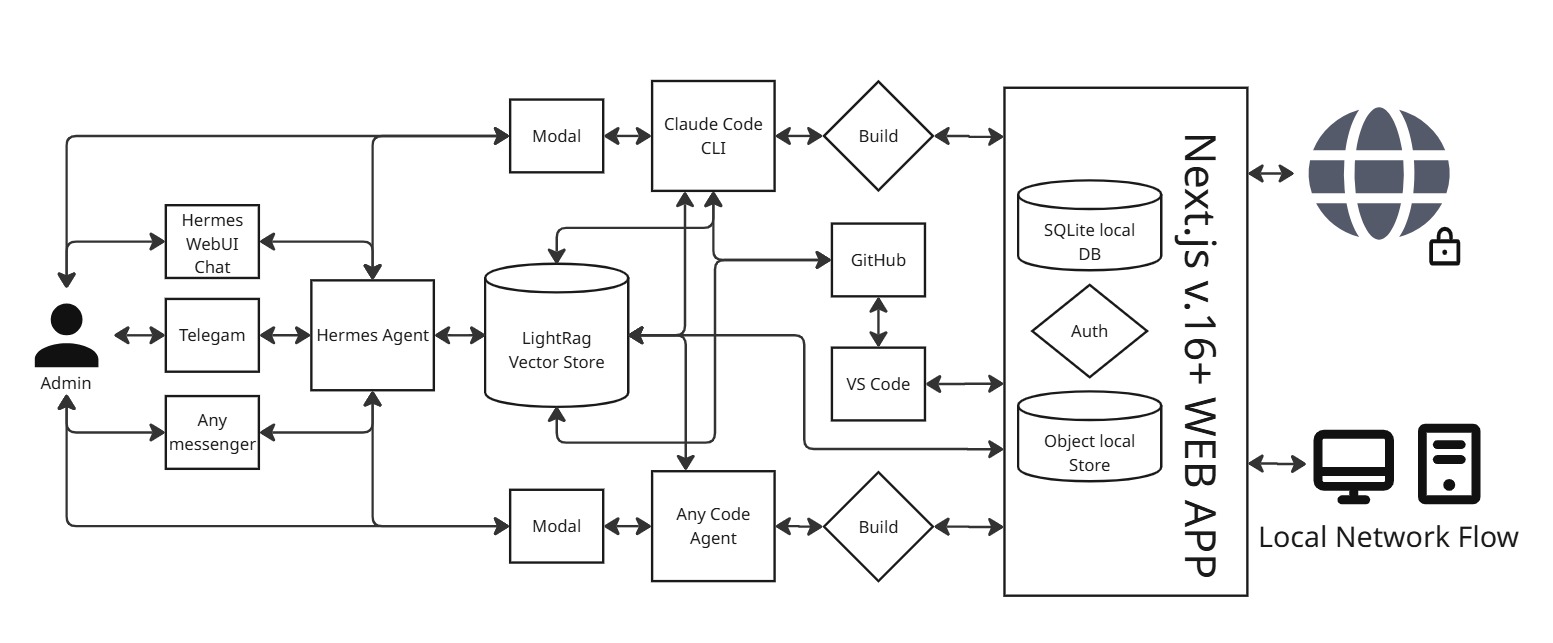
You drive it through middle layers, never raw infrastructure. As the admin you have two ways in. You can manage the project through Hermes — the brain — in natural language using the Hermes chat Web UI inside your workspace, and you can also reach the same brain from Telegram or any other messenger. Or you can work directly with the coding agents in their terminals.
It keeps working even without an API subscription. Between you and a coding agent sits a small modal sign-in layer: you authenticate your existing subscription there, and the same window sends commands and receives results. Hermes talks to the coding agents through the Model Context Protocol (MCP) that drives that very window — so work stays resilient even when a third-party subscription tool is rate-limited.
LightRAG is the central memory — this is where the token savings come from. Every tool reads and writes a shared vector database through its own connector. Recalling exactly the right context instead of re-sending everything cuts token spend dramatically. That is why LightRAG is the central memory — a Knowledge Graph RAG shared by every agent and every session.
Hermes is the brain; the coding agents do the heavy lifting. We call Hermes the central brain, but the hardest work — generating code — is done by the coding agents such as Claude Code. Hermes is a light multi-agent orchestrator: it tracks each platform’s token use, picks the right platform for a task, dispatches the work, launches deployments, and talks to GitHub.
It also runs locally. Without a paid subscription you can still use AI models — Hermes can run automatically, or you use the manual tools. This Open Code (source-available), self-hosted AI platform runs on Next.js on a standard VPS, with a built-in local database and object storage, plus many tools that streamline the work.
The output is a secure web app. On the way out the project is served over a secure HTTPS connection when you run it on your own domain, or it runs on a local machine over a plain IP address — in which case you secure the connection with one of the available options. To see how this architecture actually *builds* software — how one request becomes tested, deployed code — read the Fractera development loop.
What the AI Workspace looks like
This is what you get inside Fractera right after you deploy — a rich workspace that starts on its own.
It starts ready. The workspace opens on the Hermes chat Web UI, ready to go. To activate Hermes you set your own key — and the same key can activate your Memory. Open the Brain tab, then the Memory tab, and press Activate in Memory to start embedding the starter documentation, so it is available at any time — used both as a help desk and by the coding agents.
Pick your coding models. The top row lists the five coding platforms. Choose one or several, open it, and activate its subscription — just follow the prompts. The far-right card is the Terminal, handy for watching the development process, and where you can add another code-generation platform.
Everything is one panel. On the left, the Settings tab opens full control over your app and tools. In the footer you connect your GitHub repository and trigger a deploy by hand. Top-right, Preview shows the current state of the page you are building; unlike the main app, this view can highlight code and route a request from a selected element straight to the Hermes chat or Telegram.
It explains and improves itself. The project ships fully Open Code (source-available), so Hermes — or any model — can read this very codebase and explain any feature, or improve not only your end apps but the admin panel itself. A word of caution: experiment on a secondary account and keep your main one on proven solutions. Found a bug or want to add something? Open a pull request.
One click to all of it. This whole setup on your own server takes literally one click: enter your server credentials, start the deployment, make no choices — and in about 10 minutes you get a fully configured app. Then you change your server access and connect a domain, and the security certificates assemble themselves automatically.
Hermes — the orchestrator (Company Brain)
Hermes is the multi-agent orchestrator at the centre of the workspace (process fractera-hermes, dashboard on port 9119). It reads its identity and memory at every wake-up and drives the five coding platforms through their MCP bridges — the AI agent orchestration that makes Fractera a true multi-agent system.
Hermes is deliberately light: it does not write the hard code itself. It tracks how many tokens each platform is spending, chooses the platform that fits a task, dispatches the work to specialized coding assistants, records every build into the Product Loop journal, launches deployments, and integrates with GitHub. Its wiring lives in config.yaml (what it can reach); its personality lives in SOUL.md (who it is).
Hermes Chat Web UI
The chat window inside your workspace (fractera-hermes-webui, port 9120) where you talk to Hermes in plain language. You brief the brain like a teammate and it drives the five coding platforms for you — no commands to memorise. This is the primary way most people use the system.
Telegram and messengers
A gateway process (fractera-hermes-gateway) lets you reach the same brain from Telegram on your phone, and the design extends to any other messenger. Start, check on, or steer work away from the keyboard; the workspace keeps building while you are out.
LightRAG — the central memory
LightRAG (fractera-rag, port 9621) is the shared long-term memory of the whole workspace — not just Hermes. It is a Knowledge Graph RAG implementation: every agent queries the same graph and writes back to it — Hermes and all five coding platforms.
That shared memory is the reason Fractera spends so few tokens. Instead of pasting the whole codebase into every prompt, each agent recalls exactly the relevant entities, relations and decisions. Ingest a document once and every agent can use it forever. It needs an embedding/LLM key to be active; without one it stays wired but silent. More background in the project knowledge base.
Coding agents
Five subscription AI coding assistants run preconfigured on your server and do the heavy lifting of automated code generation. Each is driven through a bridge that keeps it alive over WebSocket and exposes it to Hermes as an MCP server (ports 3210–3214). You run them on your existing subscriptions — no API keys, no per-token billing — and you can switch platform mid-task without losing context, because LightRAG keeps the thread. See all five platforms on the homepage.
Claude Code
Anthropic’s coding agent. Its primary project-context file is CLAUDE.md. Strong at architecture, planning and careful multi-file changes — often the platform Hermes hands the hardest work to.
Codex
OpenAI’s coding CLI. Its primary project-context file is AGENTS.md. A fast generalist for implementation and iteration.
Gemini CLI
Google’s coding agent. Its primary project-context file is GEMINI.md. Large context window — useful for sweeping over big codebases and reviews.
Qwen Code
Alibaba’s coding agent. Its primary project-context file is QWEN.md. Another subscription option in the rotation Hermes can delegate to.
Kimi Code
Moonshot’s coding agent. Its primary project-context file is AGENTS.md. Rounds out the five platforms so Hermes always has an alternative when one subscription is busy or limited.
Frequently asked questions
- Do I need API keys or per-token billing?
- No. The five coding agents run on your existing subscriptions, authenticated through a modal sign-in layer; Hermes drives them over MCP. You only need an embedding/LLM key to activate the LightRAG memory.
- Where does the workspace run?
- On your own VPS or local machine. It is an Open Code (source-available), self-hosted platform on Next.js with a built-in local database and object storage; your data and code stay on your server.
- How long does deployment take?
- About 10 minutes from one click — enter your server credentials, start, make no choices, and you get a fully configured workspace. Connect a domain afterwards and the HTTPS certificates assemble automatically.