
MCP Coding in Agentic Engineering: One Messy Request Becomes a Development Pipeline
A major update to our agentic engineering platform: you no longer feed tasks to AI agents one at a time. Say everything at once — even messily — and the platform decomposes it into an ordered pipeline of development steps, written to disk and approved by you before the first line of code is written or the first frozen MCP brick is thawed.
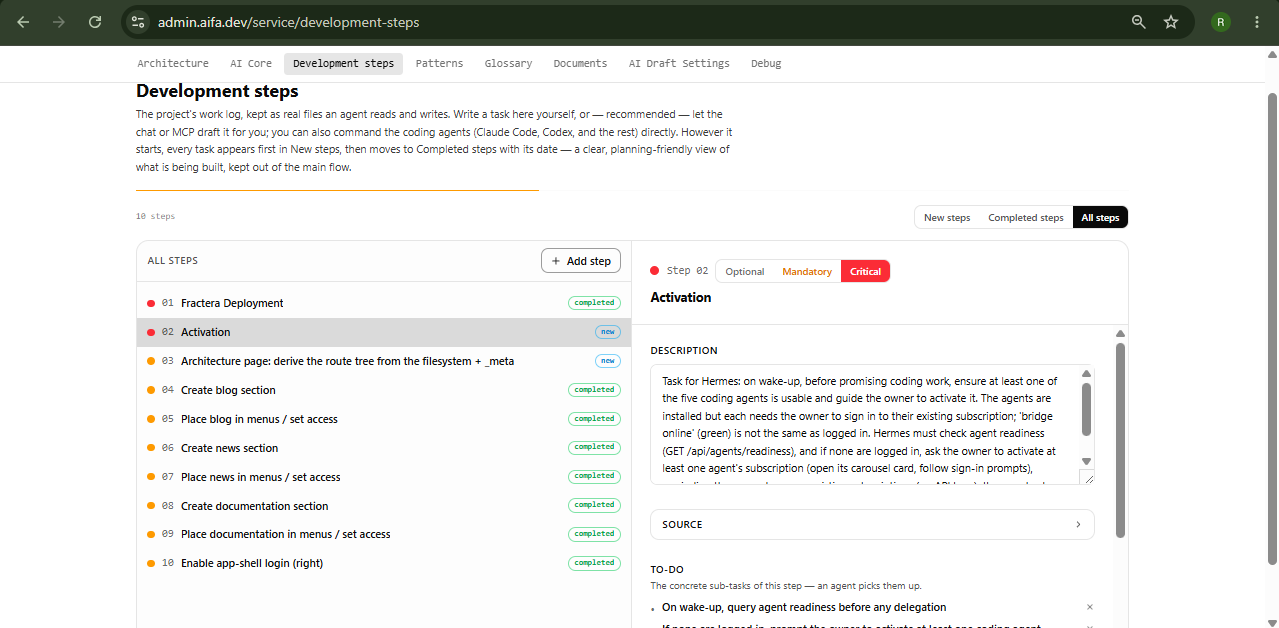
“The pipeline is assembled, shown to you, and approved before the first line of code is written — and before the first frozen MCP brick is thawed.”
Until recently, working with AI agents on Agentic Engineering Infrastructure looked the way it looks everywhere: one task per message. Add a news section. Wait. Add a documentation section. Wait. Add a sign-in button. Wait. Now make documentation visible only to signed-in users. Four separate requests, four separate waits, and the burden of remembering the right order was on you. Today that changes: the platform for agentic engineering takes the whole order at once — long, unstructured, even messy — and turns it into a development pipeline you can read, approve, and watch run.
Four Tickets Become One Request to Your AI Agents
Here is the same job, before and after. Before, each line was its own ticket you had to send in the right order:
- Add a news section to the site
- Add a documentation section to the project
- Add a sign-in button to the site
- Make the documentation available only to signed-in users
Now you say all of it in one message — dictated by voice, with typos, in any order. Dedicated MCP tools and agent skills decompose the request by the actual state of your site: does the news section already exist? Is public login already enabled? The decomposition is deterministic — the agent checks the project, it does not guess. And crucially, the fourth task ("documentation for signed-in users only") is understood as what it really is: a dependency that implies enabling site login and gating one section by role — the plan even shows this as an explicitly marked implied line.
An Order Sheet Before the First Line of Code
The decomposed request becomes an order sheet — the construction-brigade kind: one resolved human line per section ("news — visible to EVERYONE — appears in: top menu, footer"), the implied consequences spelled out, and an honest content boundary: new pages come up as frozen placeholder stubs, and filling them with real prose is a separate, later request. The agent must show you every line verbatim. Two questions per section are mandatory and are never guessed — whether the section needs an admin panel and whether it needs a dashboard.
- Decompose — your compound request is flattened into fine sub-steps: create section → add pages → set menus → set access.
- Show the order sheet — you read the resolved plan, line by line, and edit it while it is still just a plan.
- Approve — your explicit "yes" issues an approval token bound to exactly that plan; a changed or unconfirmed plan cannot start.
- Run — every sub-step executes through the full lifecycle: open a development step → execute → deploy → record the deployment → close the step.
The deployment record is a hard gate, not a courtesy: a step cannot close without a confirmed row in the deployments table — the same discipline hosting platforms apply to their own deploys. If recording fails, the step stays open and the run stops with an honest report instead of a silent shrug.
The Plan Lives on the Development Steps Page — Not in the Agent’s Memory
This is the part we consider the deepest change. The moment you approve, the orchestrator first writes the entire queue to disk — every sub-step becomes its own file on the Development Steps page, carrying its full machine spec: the order-sheet id, its sequence number, what it does, its arguments, the page URL it will produce, and the approved order line it came from. Only then does execution begin. The plan history exists on disk before any work.
Why does that matter? Because long runs die: a timeout, a crash, a lost session. With the queue materialized first, nothing is lost — completed sub-steps are closed with a full timestamp, the live one is marked in progress, and the pending ones sit as real specs waiting. To resume — even in a brand-new session, on a cold start — the agent calls the same tool with the same plan and the same approval token: finished steps are skipped automatically, pending ones re-execute from their files. No re-briefing, no duplicated sections, no archaeology.
Two Scenarios of Agentic Engineering: Flat MCP Coding and Recursive Development
Flat scaling — MCP coding on inexpensive models
Standing up new structure — sections, pages, menus, access — is MCP coding: assembly from vetted frozen bricks via the Frozen Template Constructor, pure file copy plus token substitution, zero code generation. Because no code is generated, any model produces the identical result — so this whole pipeline is deliberately run by Hermes on inexpensive models. MCP coding scales the architecture flat: it adds structure breadth-wise, never rewrites what exists.
Recursive development — when a coding agent takes over
When a task cannot be finished by MCP coding alone — real prose, a real feature, changing an existing page — Hermes does not pretend. It delegates the work to one of the available coding agents: Claude Code, Codex, Gemini CLI, Qwen Code or Kimi Code — whichever is ready right now, meaning it has tokens available or an open session window within its subscription. A coding agent works differently: its process may be recursive and more creative, at the agent’s own discretion — it decomposes deeper as it goes, extracts patterns, and grows new steps mid-flight. And if no coding agent is currently active, that is not a failure: the task is calmly saved as a development step to return to later.
Watching AI Agents Work: Two Live Pages Instead of a Silent Chat
While the pipeline runs, the chat goes quiet — and that used to feel like a black box. Now you watch the work happen. On the Architecture page, new routes, pages and service components appear on the live map of your app as they are built. On the Development Steps page, each step carries a status badge — new, in progress, completed — and closes with a completion time down to the second. Both pages poll the filesystem and pulse the nodes that just changed.
Toward Application Development 100× Faster and 100× Cheaper
Every piece described here serves one direction: turning the development of complex applications into a fast, inexpensive process that is genuinely interesting to watch from the outside — where it is always clear what is happening and why. Flat MCP assembly on cheap models does the structural bulk; expensive creative attention is spent only where it is irreplaceable. Very soon we expect to say it in the affirmative — and show it in worked examples — that Fractera builds applications up to 100× faster and 100× cheaper than traditional app-generation and automation systems. We are on the threshold of final testing; what the platform already does, you can see and try today. Stay with us — it only gets bigger from here.
Deploy your first AI-optimized workspace today — choose your framework and get started.
Deploy with AI
Only fools and dead men never change their minds.
 Roma ArmstrongFounder at Fractera.ai
Frequently asked questions
- What is MCP coding and how is it different from an AI agent writing code?
- MCP coding is assembly, not generation: new sections and pages are composed from vetted frozen templates by file copy and token substitution, driven through MCP tools. No code is generated, so any model — including inexpensive ones — produces the identical result, and the architecture scales flat (structure is added, existing code is never rewritten). Writing or changing real code is the other scenario, real development, done only by coding agents such as Claude Code or Codex, whose process may be recursive and more creative at the agent’s discretion.
- What happens if the process crashes in the middle of a long run?
- Nothing is lost. On approval the orchestrator first writes the entire queue to the Development Steps page — every sub-step as its own file with its full machine spec — and only then starts executing. Completed steps are closed with a timestamp, pending ones wait as real specs. To resume, even in a brand-new session, the agent calls the same tool with the same plan and the same approval token: finished sub-steps are skipped, pending ones re-execute from their files.
- Who executes the pipeline — Hermes or the coding agents?
- Both, by scenario. The flat MCP-coding pipeline (new sections, pages, menus, access) is run by Hermes — or any single agent — on inexpensive models, because frozen assembly needs no creativity. When a task cannot be finished by MCP coding alone, Hermes delegates it to an available coding agent (Claude Code, Codex, Gemini CLI, Qwen Code, Kimi Code) — one that currently has tokens or an open session window within its subscription. If none is active, the task is saved as a development step to return to later.
- Can this pipeline change pages that already exist on my site?
- No — by design. The frozen pipeline accepts only create-new operations: standing up sections and placeholder pages. Modifying an existing page or authoring real content is the real-development scenario, routed to a coding agent. The order sheet states this boundary explicitly before you approve, so a placeholder never masquerades as finished content.