
Architecture → Development Steps: An Agentic Engineering Platform That Builds From the Project Tree
It ships with every Next.js-based starter — a visual map of your app where you, or an AI agent, declare the pages and endpoints to build, then send the whole backlog into one development step with a single click
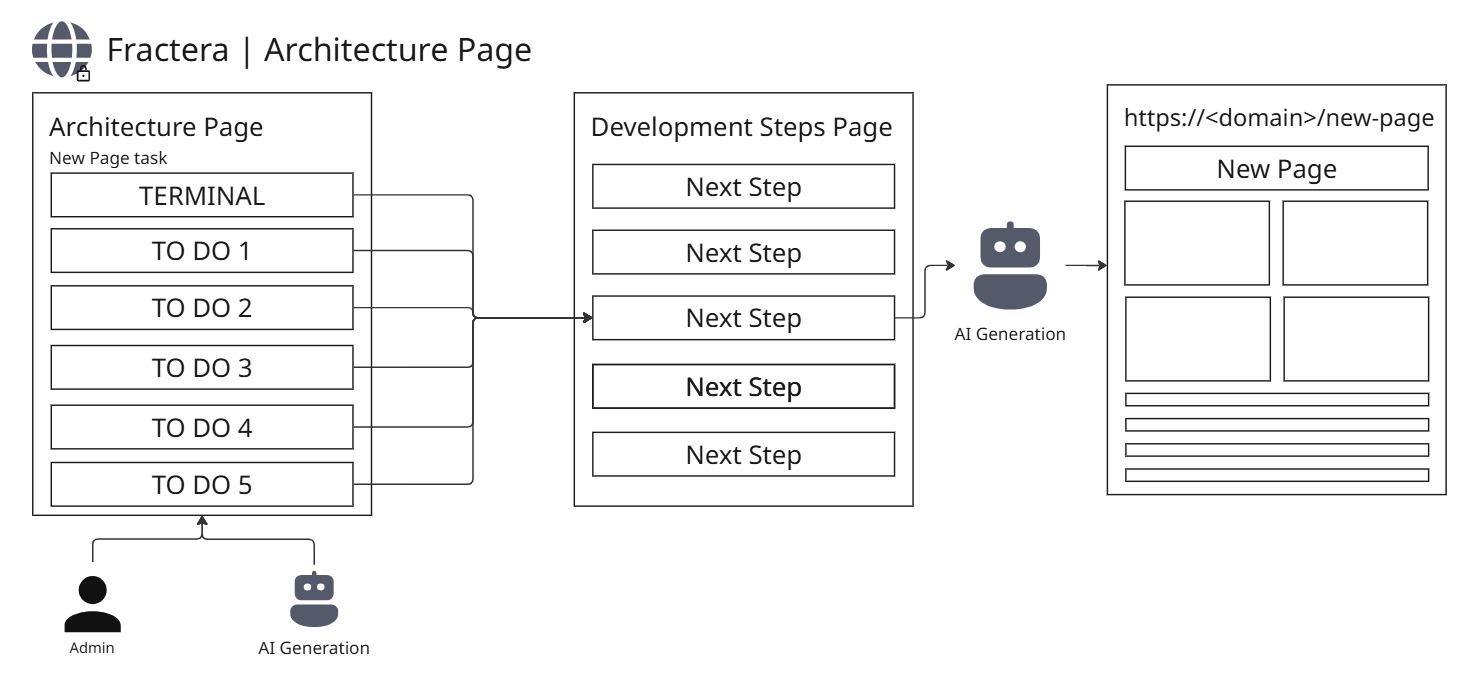

You are used to building vibe-coding projects through a chat — and it feels like the only way. But what if it is not? I designed a concept where you send a page-generation request not into a chat, but straight into the project tree: you open the right folder, add a page, drop in code examples — say, a sample of a beautiful design element — lay out the task step by step, like in Todolist, and send it into the build queue. Today this stage is already real. But one day it will look to you like a tiny crumb of the much bigger idea I am building.
 Roma ArmstrongFounder at Fractera.ai
Fractera adds one more page to every workspace: Architecture. It is a living map of your app — every page and endpoint with its own typed descriptor. But between you and those real files sits a draft layer: you — or an AI agent — declare a page-to-be and write the intent in free form, without touching live code. It is the heart of an agentic engineering platform: the twin of the AI Draft Settings page — that one evolves an agent's skills, this one builds ordinary code. Both cycles meet in the same place — the Development Steps page.
A Map of Your App Where Work Is Declared Before Code Is Written
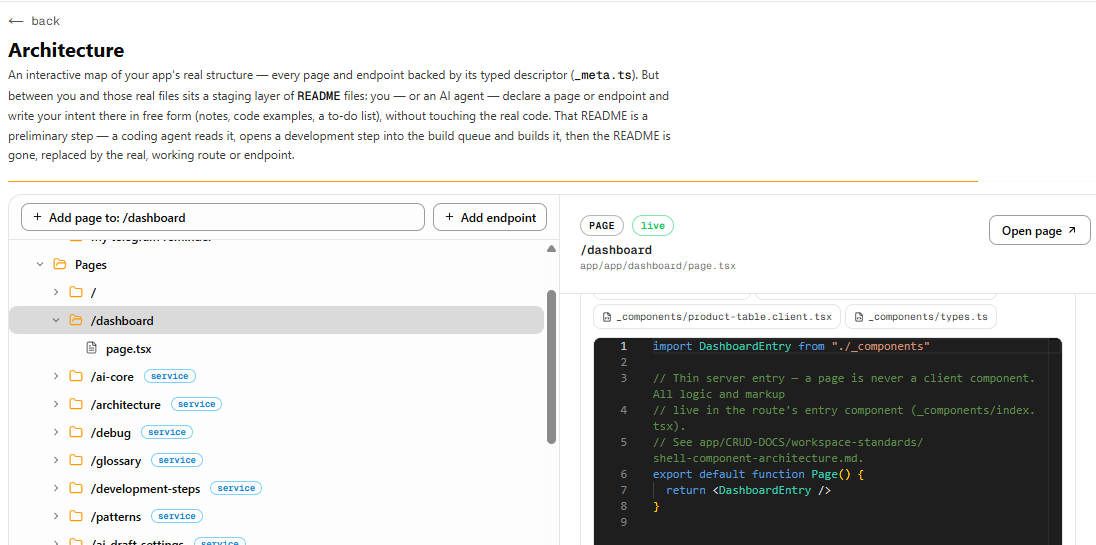
Think of Architecture as a map of your project's real structure. It shows every live page and endpoint. It also lets you leave a record of code work — a brief that later turns into a build. Records come in three kinds, all written to a plain README on disk (no database): a declared page or endpoint (a README with no file yet), a to-do on a live route, and a deletion/refactor request. A declared node glows amber with a req badge, so it is obvious something is waiting to be built.
It comes with every Next.js-based framework
The Architecture page ships with every Next.js-based starter Fractera deploys. You do not install it or wire it up — the moment your workspace comes online, the map is already there and connected to all six AI agents. (Support for other framework families is on the way.)
- Declare a page or endpoint at any depth in the tree — a README of intent, with no live code
- Leave a to-do on a live route, or a deletion request — all in the README, the source of truth on disk
- Before declaring a page, the agent decides the access shape (public / private / guest) — up front, not guessed afterward
- A live tree highlights changes in real time — you can see what a background agent is doing right now
- The same flow works for six agents: Claude Code, Codex, Gemini CLI, Qwen Code, Kimi Code, and Hermes
Two Ways to Declare: By Hand in the UI, or by an Agent
Doing it yourself, in the interface
Open the page and you see the route tree on the left and the selected node's panel on the right. "Add page" and "Add endpoint" declare a new route at any depth; a live route carries a to-do list and a "danger zone" with a deletion request. None of this writes live code — it is a staging layer of intent. You record what needs building, and it waits its turn.
Letting an agent do it
The page is not just for people. Any of the agents can, in the middle of a normal session, call a built-in skill — `declare-architecture-page-or-task` — describe a page, endpoint, or task, and the record shows up on the map on its own. Hermes does the same through its connector (`owner_arch_create_record` on the `arch-bridge` server, port 3222). The part that matters most: every agent carries its own copy of this ability. It keeps working even if your project runs just one agent and nothing else — no shared brain required, no single point that can fail.
One Click Turns the Whole Backlog Into a Build Step
Once the map holds declared pages and tasks, hover a pending node and two buttons appear. Launch bundles every pending record into one development step: a detailed brief with a section per record (what to build, change, remove) — and clears the source records off the map. Delete removes just that record, with a confirm. The real route file is never touched — only the staging record is cleared. The same bundle is available to an agent through the `owner_arch_send_to_steps` connector.
Notice what does not happen: declaring a page is never turned into code automatically. That is a deliberate choice — the same one behind the skill draft conveyor. Kicking off a build the instant you declare could crowd the agent's context window, drag down the quality of code in the main process, or burn through your token budget early. So the hand-off is always a conscious step.
In short, the cycle is three simple moves:
- Declare — record a page, endpoint, or task on the map (with its access shape).
- Bundle into a step — press Launch: every declaration folds into one Next Step on the Development Steps page, and the map clears.
- Build — an agent (or you) builds the real pages and endpoints, and they go live.
“Architecture is the map of intent. First you sketch what should exist; then, in one move, you turn the sketch into a build queue.”
Two Cycles, One Discipline: Skills and Code Grow the Same Way
Fractera runs two parallel conveyors, and both meet at Development Steps. AI Draft Settings grows an agent's skills and tools; Architecture builds the app's ordinary code. They are twins — the same "declare → bundle into a step → build" mechanic, but different domains. Not two duplicates, but two sides of one approach: a visible, auditable path from intent to a working feature.
And like the skills conveyor, this is part of a larger plan — a loop that over time runs more and more on its own, much like Fractera's autonomous development loop: a need shows up, an agent plans it, builds it, checks it, ships it, and writes down what happened.
Deploy your first AI-optimized workspace today — choose your framework and get started.
Deploy with AIFrequently asked questions
- What is the Architecture page and what does it do?
- Architecture is a workspace page included with every Next.js-based Fractera starter. It is a living map of your app's real structure — every page and endpoint with its descriptor. On top sits a staging layer where you or an AI agent declare pages and endpoints to build, leave to-dos on live routes, and file deletion requests — all in plain READMEs on disk, no database. Declared nodes are marked with an amber req badge.
- How does a declared page become real code?
- Once the map holds declarations and tasks, you hover a pending node and press Launch — every pending record bundles into one development step on the Development Steps page, and the source records are cleared off the map. Then an agent (or you) builds the real pages and endpoints. Auto-launching a build the instant you declare is deliberately off, to avoid crowding the agent's context window or burning token budget — the hand-off is always a conscious step.
- How do AI agents use the Architecture page automatically?
- Any of the six agents can call a built-in skill, declare-architecture-page-or-task, to declare a page, endpoint, or task on its own, with no human in the loop. Hermes does the same through the owner_arch_create_record connector (the arch-bridge server, port 3222), and the backlog can be bundled into a step via owner_arch_send_to_steps. Each agent carries its own copy of the skill, so it is self-sufficient with no single point of failure.
- How is Architecture different from AI Draft Settings?
- They are two parallel twin conveyors, both meeting at Development Steps. AI Draft Settings grows an agent's skills and MCP tools; Architecture builds the app's ordinary code (pages and endpoints). The mechanic is the same — declare, bundle into a step, build — but the domains differ. They are not duplicates, but two sides of one development approach.