
Hermes, the Brain of an Agentic Engineering Workspace | Setup, Components & Recovery
What Hermes is in an agentic engineering workspace — the orchestrating brain that delegates to coding agents — what it is made of, how it comes up on a fresh server, the pitfalls that break it, and how to bring it back if it is ever deleted.
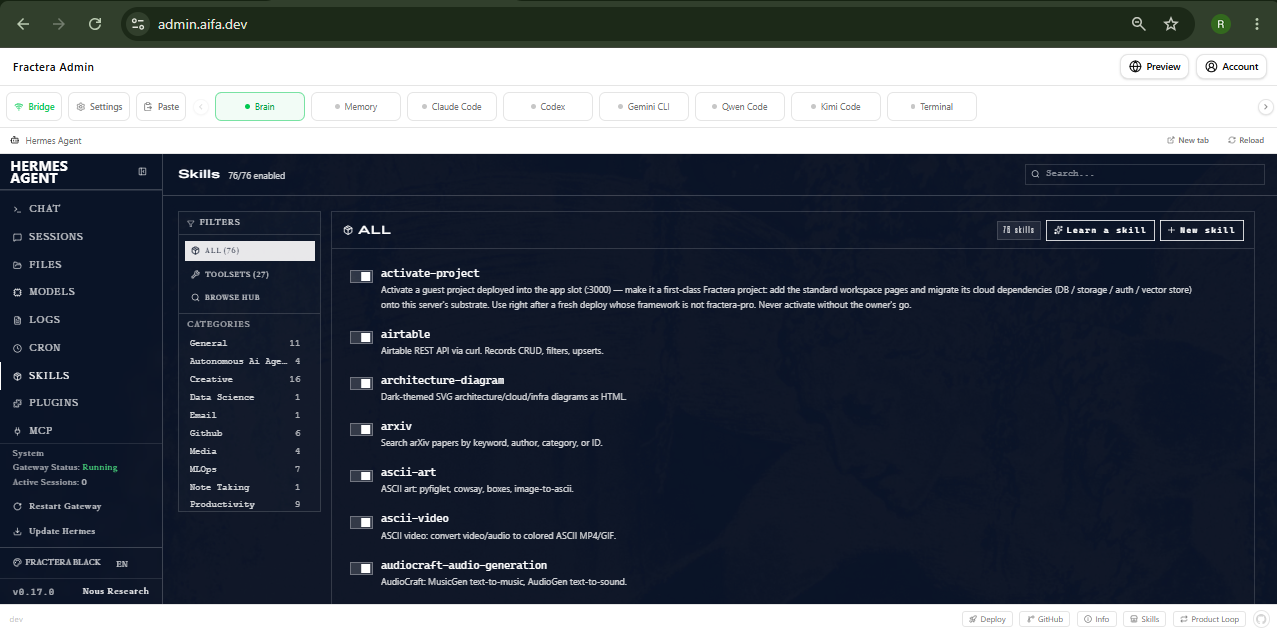
“Hermes is the brain of your workspace — the part that decides, delegates and remembers. This is the short, important guide to what it is, how it stands up, and how to bring it back if it ever disappears.”
Fractera is an Agentic Engineering Infrastructure: a secure, self-hosted workspace where AI models write and run your application on your own server. At its centre sits Hermes — the orchestrating brain. This guide explains, plainly, what Hermes is made of, how it comes up on a fresh server, and how to recover it if it is ever deleted. It is written to be read by a technical human and by an AI agent alike — a continuity record, so the knowledge never lives only in someone’s head.
Who Hermes is — the brain, not the hands
Hermes orchestrates; it does not type your app’s code. The actual code is written by the five coding agents, each holding a terminal in the app. Hermes’ job is to choose the right agent, check readiness, delegate the task, and run everything around the code — settings, deployment records, company memory. It is one of several agents in a multi-agent workspace; it is the one that conducts.
What Hermes is made of
Hermes is not a single binary you flip on — it is a small set of parts, each with a clear home. Knowing them is what makes it recoverable.
Surface        Port    Process                  Role
--------------------------------------------------------------
Agent dash     :9119   fractera-hermes          the brain + control panel
Chat Web UI    :9120   fractera-hermes-webui    friendly built-in chat
Gateway        —       fractera-hermes-gateway  Telegram/messengers + cron

Component      Where it lives (/root/.hermes/)
--------------------------------------------------------------
Identity       SOUL.md            <- who it is + its place in the architecture
Skills         skills/<name>/SKILL.md   <- one folder per skill, with frontmatter
Plugins        plugins/
Config         config.yaml        <- mcp_servers (the tool bridges) + model
MCP bridges    readiness, deployments, app-settings, drafts, ...
How it comes up on a fresh server
On every deployment, the install script lays Hermes down from the substrate and starts its processes — so a fresh server has a working brain with no manual steps.
install plugins      -> /root/.hermes/plugins/
install skills       -> /root/.hermes/skills/<name>/SKILL.md   (folders, not flat files)
install SOUL.md      -> the Fractera persona + architecture self-knowledge
start agent          -> dashboard on 127.0.0.1:9119  (NOT 0.0.0.0)
start gateway        -> messaging + cron
install web UI       -> chat on :9120
save process list    -> survives a reboot
Where skills and MCP live — and how /ai-core mirrors them
This is the part that actually bit us, so it is worth seeing the data move. A skill is a folder, `<name>/SKILL.md`, with a small header (its name and a description of when to use it). One canonical copy lives in a shared `.agents/skills` folder that two agents read directly; the other coding agents keep a copy in their own folder; and Hermes keeps its copy in the workspace substrate, which the install step lays down into its home on every deploy. An MCP (a tool the agent calls) is a bridge process plus a one-line registration in every agent’s MCP config. The flow, end to end:
A WISH                  →  A STEP            →  MATERIALIZE (write real files)     →  MIRROR
architect/agent writes     drafts collected      the agent writes the capability        /ai-core re-reads
a draft on the             into one dev step      in the canonical shape for EVERY       the disk and shows
AI Draft Settings page                            agent:                                 the live catalogue
(no real file touched)                            - skill  -> <name>/SKILL.md (+ copies
                                                            + Hermes substrate)
                                                  - mcp    -> bridge + register in each
                                                            agent’s MCP config
                                                  - instr. -> the agent’s root file
                                                            (SOUL.md for Hermes)
The catalogue you actually browse is the architect-only `/ai-core` page inside the workspace: it is a live mirror — every time you open it, it re-reads the real files on disk and renders the tree, so it always shows what is truly installed on this server (the public site has read-only showcase pages too). The one rule that keeps this honest: the format on disk, the scanner that reads it, and the install step that places it must all agree. Our outage was exactly this disagreeing — skills were moved to folders but the mirror still looked for flat files, so Hermes’ skills showed as empty. One shape everywhere fixes it for good.
The three things that will bite you
- Bind 127.0.0.1, never 0.0.0.0. The June-2026 hardening refuses a public bind without an auth provider, and the old bypass flag is now a no-op. A public bind crash-loops the agent, the port never opens, and the proxy returns 502.
- The proxy must send Host: 127.0.0.1 to the agent. The same hardening checks the Host header against the bound address; the public hostname is rejected with “Invalid Host header”. Only the agent’s own location needs this — the chat and auth stay as they are.
- Skills are folders, never flat files. Hermes discovers a skill only as a folder with a SKILL.md inside (plus frontmatter). A bare markdown file is invisible, and the agent will silently pick the wrong skill instead.
A useful tell: if the chat (:9120) answers but the agent tab shows 502, those are two different processes — the chat being alive does not mean the agent is. Check the agent process and its log first.
Recovery — bringing Hermes back
Full recovery is simply a fresh deployment: everything Hermes needs is in the substrate and ships with the install. Partial recovery — Hermes removed but the server alive — means reinstalling its parts from the substrate (skills as folders, SOUL.md, plugins, config), then restarting the agent (bound to 127.0.0.1), the gateway and the chat, and saving the process list. The proof it worked: the skill list shows your skills as enabled, the agent answers on its port, and the process is no longer restarting.
Deploy a self-hosted workspace with an orchestrating brain that delegates to your coding agents — entirely on your own server.
Deploy with AI
Fix your mistakes fast. If you experiment all the time there will be many of them — but if you fix them in time, no catastrophe happens.
 Roma ArmstrongFounder at Fractera.ai
Frequently asked questions
- What is Hermes and how is it different from the coding agents?
- Hermes is the orchestrating brain of the workspace. It does not write your app’s code itself — that is the job of the five coding agents (Claude Code, Codex, Gemini, Qwen, Kimi). Hermes decides who does what, checks which agents are ready, delegates the work, and manages the environment around the code: settings, deployments, memory. Think of it as the conductor, not a player.
- What is Hermes actually made of?
- A persona file (SOUL.md, loaded into its prompt every message), a library of skills (each a folder with a SKILL.md), plugins, a set of MCP tool bridges it calls, a config file, plus two sibling processes — the chat Web UI (:9120) and the messaging gateway. The agent dashboard itself listens on :9119.
- Why would Hermes show a 502 error after a deploy?
- The June-2026 Hermes hardening refuses to open the dashboard to the outside world (0.0.0.0) without an auth provider, and it validates the Host header against the address it bound to. So it must bind 127.0.0.1, and the reverse proxy must present that same host to it. If either is wrong the agent process crash-loops or rejects the request and the dashboard returns 502 — while the chat, a separate process, keeps working.
- If someone deletes Hermes, can it be brought back?
- Yes. Everything Hermes needs lives in the workspace substrate and ships with every deployment, so a fresh deploy installs it from scratch. If only Hermes was removed but the server is alive, you reinstall its parts from the substrate and restart its processes. This document — and its downloadable reference — is exactly the knowledge needed to do that without rediscovering the pitfalls.