
Multilingual Authentication for Agentic Engineering — 82-Language Login & Registration Forms
A small but important update to the starter templates of our agentic engineering platform: the sign-in and sign-up forms now appear in the visitor's own language out of the box — no work on your side
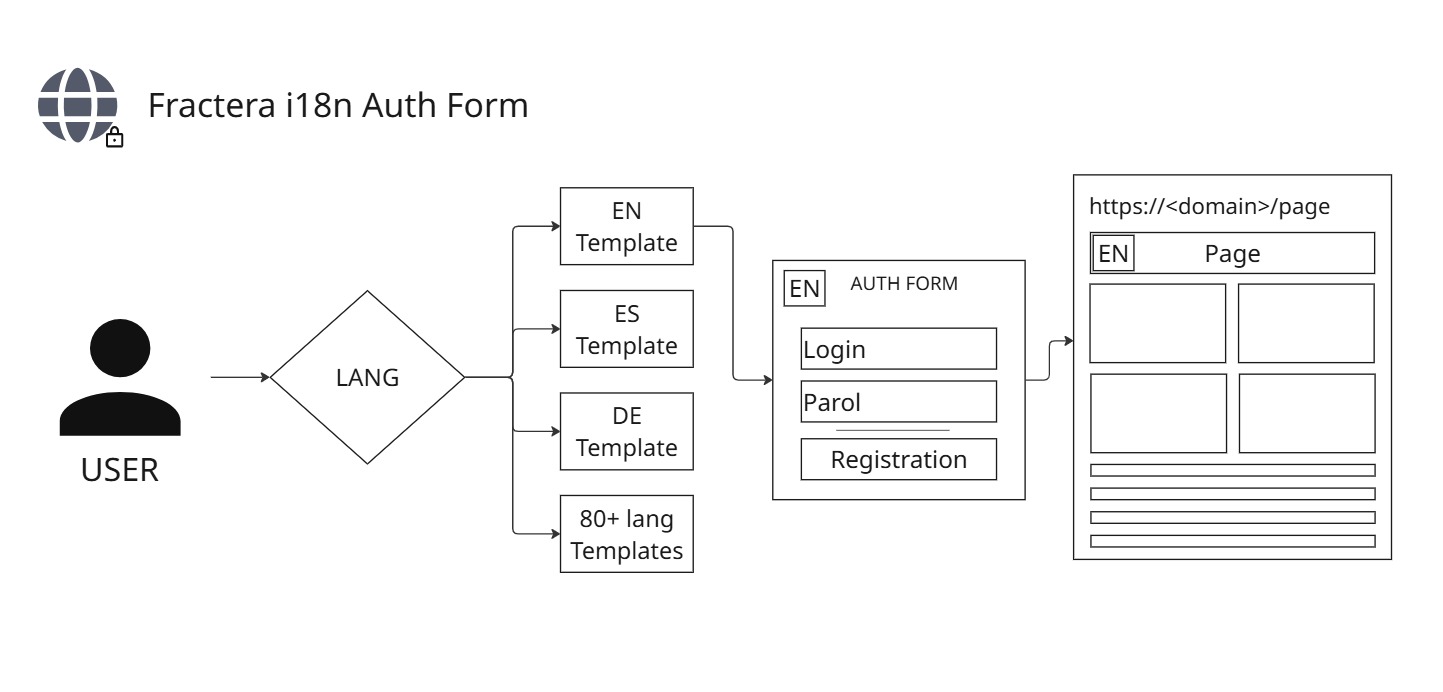
“I want to keep this one simple. If you are building for clients in your region, the very first screen they meet should feel like home — and that screen is almost always the sign-in. So we made it speak their language by default. You deploy, and the registration and login forms are already in the right language, both for you and for the people you serve. Nothing to set up.”
Fractera is an Agentic Engineering Infrastructure — an agentic engineering platform where AI agents build and run your project on your own server. No matter which region you work in, you should not have to stop and think about how to translate the sign-up form on your site so your customers can register comfortably in their own language. So we extended the starter templates to do it for you.
Today's update is about the registration page — specifically the login form and the registration (password) form. From now on, no matter what country you are in, the moment your project is deployed you will see these forms in your own language. The same is true for the users of your site: if you turn on sign-in for them, they automatically see the form in their own language too.
How it works
The form reads the language of the visitor's browser and shows the matching words. Only the words are localized; the input fields themselves stay exactly as they were. Because every translation is baked in at build time, the page is served as plain static HTML — fast, light, and the same for everyone, with English as the natural fallback when a browser asks for something we have not translated.
All 82 languages, by default
Out of the box, the forms ship with translations for the following languages:
- English
- Français
- Español
- Português
- Deutsch
- Italiano
- Nederlands
- Svenska
- Norsk
- Dansk
- Suomi
- Íslenska
- Ελληνικά
- Polski
- Čeština
- Slovenčina
- Magyar
- Română
- Hrvatski
- Slovenščina
- Eesti
- Latviešu
- Lietuvių
- Malti
- Català
- Galego
- Cymraeg
- Gaeilge
- Euskara
- Русский
- Українська
- Беларуская
- Български
- Српски
- Bosanski
- Македонски
- Shqip
- Қазақша
- Oʻzbekcha
- Кыргызча
- Тоҷикӣ
- Türkmençe
- Azərbaycan
- Հայերեն
- ქართული
- Монгол
- العربية
- Türkçe
- עברית
- فارسی
- Kurdî
- Afrikaans
- Kiswahili
- Hausa
- Yorùbá
- Igbo
- አማርኛ
- isiZulu
- isiXhosa
- Kinyarwanda
- Soomaali
- 中文
- 日本語
- 한국어
- हिन्दी
- اردو
- বাংলা
- తెలుగు
- मराठी
- ಕನ್ನಡ
- ગુજરાતી
- മലയാളം
- தமிழ்
- नेपाली
- Tiếng Việt
- ไทย
- Bahasa Indonesia
- Bahasa Melayu
- Tagalog
- မြန်မာ
- ខ្មែរ
- ລາວ
You decide the build cost — by the languages you activate
Here is the part worth understanding, because it is yours to control. Every language you keep alive is a set of pages your server builds; the more languages, the longer each build takes. You curate the set in your workspace — open the Languages settings panel and you see the full catalog of available languages as a checklist. Tick the ones your audience actually uses; English stays on, always, as the guaranteed fallback. Saving applies the choice by rebuilding the app, which statically generates the pages for exactly those languages. For your content pages this already works today: fewer ticked languages mean fewer pages and a faster build. (Under the hood this is one environment list, `NEXT_PUBLIC_SUPPORTED_LANGUAGES`, but you never edit it by hand — the checklist does it for you, and an invalid code can't slip in.)
These sign-in forms are the next thing to follow that exact rule, and it is worth being precise about how. Right now the forms carry all 82 languages on purpose: at the moment your server is built, we cannot yet know which language you — the very first account — will register in, so every language has to be present. In the next step the build will read the *same* checklist you tick in Languages settings, and a small build-time generator will emit the form dictionary for only those languages, with English always kept as the fallback. Nothing in the form changes for you; you will not edit a line of code — you tick your languages, and the build that produces your login and registration forms contains exactly those. So the build cost of your authentication becomes proportional to your real audience, not to the whole catalog — the same principle the rest of the platform already follows: generate only what you actually use.
Deploy your own AI-optimized workspace — your sign-in is multilingual from the first minute.
Deploy with AIThis is the same instinct that runs through the rest of the platform: a capability appears, and we fold it into the standard so you never have to rebuild it yourself — like the multilingual content architecture for your pages, or the autonomous development loop that turns a request into shipped code.

The takeaway: building the technology is the easy part. First you have to work out what you are going to sell, who you are selling it to, and how much they are willing to pay for it. A form that greets every customer in their own language is a small thing — but it is exactly the kind of small thing that decides whether someone in your region trusts you enough to sign up. Good luck building your business.
 Roma ArmstrongFounder at Fractera.ai
Frequently asked questions
- Do I have to configure anything to get multilingual login and registration forms?
- No. After you deploy, the login and registration forms are already localized into all 82 languages. The form shows the language of the visitor's browser automatically, with English as the fallback. There is nothing to set up.
- Will multilingual forms slow down my site or my server?
- No. The forms are fully static — every language is built in ahead of time, so there is no per-visitor language request and no extra runtime load. Only the words are localized; the input fields are unchanged.
- Which languages are included?
- All 82 languages in the platform catalog, from English, Spanish, French, German and Russian to Chinese, Japanese, Arabic, Hindi, Swahili and many more. English is always present as the fallback.
- How do I keep only the languages I need, and lower the build cost?
- In your workspace open the Languages settings panel: the full catalog of available languages is a checklist. Tick only the ones your audience uses; English stays on as the guaranteed fallback, and saving rebuilds the app to apply the choice. For your content pages this already decides how many pages are built — fewer ticked languages, fewer pages, faster builds. The next step extends the same rule to these login and registration forms: a build-time generator will emit the form dictionary only for your ticked languages, English kept as fallback. You tick the list; you never touch code or type an ISO code, so an invalid one cannot slip in.