
We Rebuilt How an Agentic Engineering Platform Publishes Multilingual Content
A behind-the-scenes story about our site's update processor — and the multilingual content skill I decided to fold into the standard architecture, because in Europe you simply cannot ship in one language

Honestly, this one started as plumbing. I wanted our own site to be nicer to move around — easier to navigate, easier to find the right thing — and that quickly turned into rebuilding the processor that updates the site itself. And the moment you touch how content is published, you bump into two truths at once: it has to be optimized for people, and it has to be optimized for search — both Google and, now, AI. You cannot skip either anymore. Then, as usual, a side-effect showed up: a small tool fell out of the work, and I decided to keep it — make it part of the standard architecture — because I think a lot of people, especially here in Europe, will need exactly this: a clean way to create multilingual content.
 Roma ArmstrongFounder at Fractera.ai
This is a slightly unusual update, because it is about us. Fractera is an Agentic Engineering Infrastructure — an agentic engineering platform where AI agents build your software. But the platform also has a public face: this very site, its news, its docs. And the part of the machine that publishes and updates that content had quietly become the thing that would not scale. So we rebuilt it. Traditionally a write-up like this would live in an engineering blog or a dry changelog — an internal note for other developers. We are publishing it as News on purpose, because on Fractera the news feed is the project's living, AI-searchable memory: every update here is embedded into the workspace's LightRAG graph memory the moment it ships.
The Problem: Content That Was Easy at Two Languages and Impossible at Eighty
Our old way of storing content was the way almost everyone starts: one growing file per content type, with a big "English or Russian" switch on top. It works beautifully — right up until it does not. Two failure modes were baked in. First, every article, post and doc of one kind was glued into a single ever-growing file. Second, translation was all-or-nothing: to add a language you had to translate the entire thing, or the page fell back to English wholesale. That is fine for two languages. For the dozens we are heading toward, it is a wall.
And scattered through the page code were little language hacks — `if the language is Russian, show this, otherwise show that`. Each one is harmless. A thousand of them, across a growing site touched by both humans and AI agents, is a slow-motion mess that no amount of good intentions keeps clean.
The Fix: One Folder Per Document, Translate Per Key
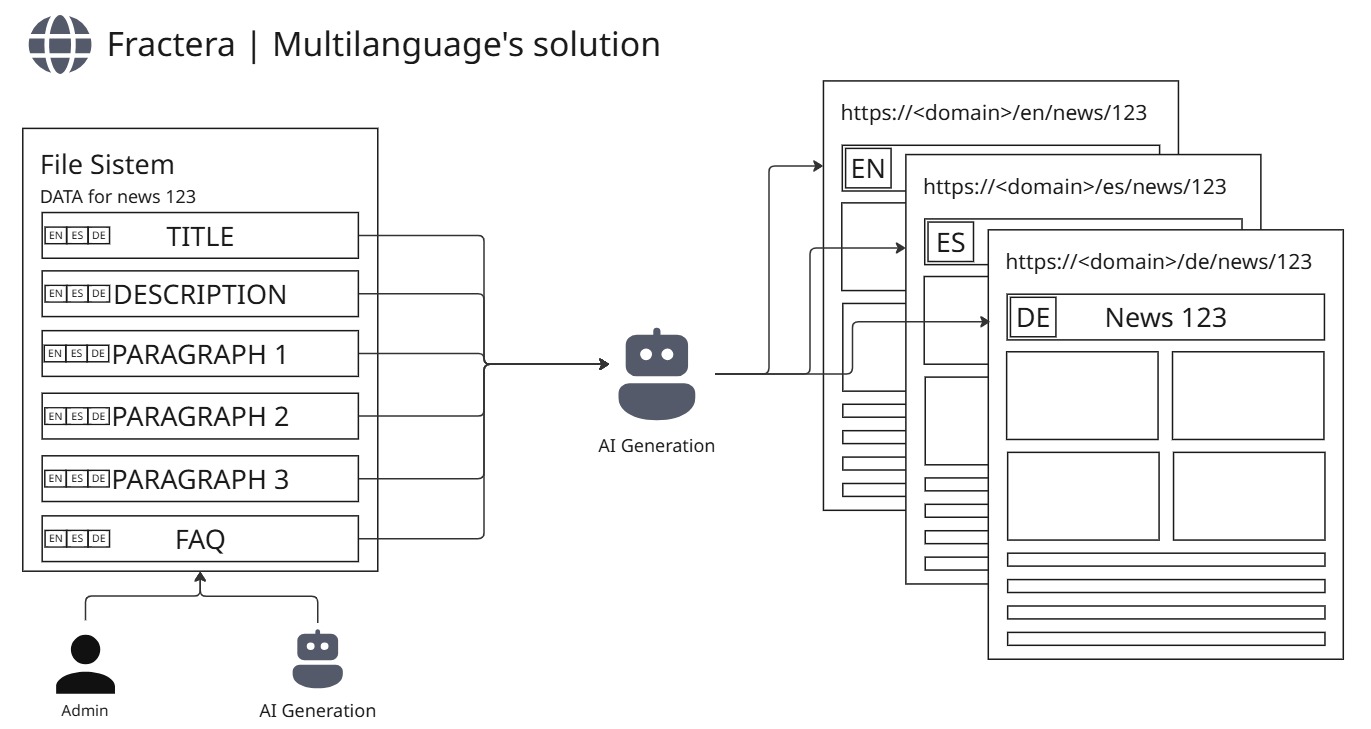
The new shape is boring in the best way. Every piece of content is its own folder: a small file for the things that do not translate (date, tags, images), one full base file in English, and — for each extra language — a partial override that only carries what actually differs. A new language is now simply a new file dropped into the folder. Nothing old gets rewritten.
- A new language = a new file. Drop `de.ts` next to `en.ts`; you never touch the existing files.
- Translate per key, not all-or-nothing. A missing field falls back to English on its own — so you can launch a language with a single translated headline and fill in the rest over time.
- No language branches in the page code. Labels live in the translation dictionary; "a different block per language" is decided by a data field, not an `if` in the markup.
- Dates render in the right locale automatically — which, along the way, fixed a real bug where a Russian article showed its date in English month names.
- A lint rule guards the line — so the old `language === 'ru'` hack cannot quietly creep back as the site and its contributors (AI agents included) grow.
The deep win is that second point. Translating "all or nothing" is the real blocker to going wide. With per-key fallback, the 81st language can ship with one translated field and render perfectly — English fills every gap. Priority languages get a full, hand-crafted translation; the long tail simply exists, correct, until someone gets to it.
“The point of the new shape is that adding the eighty-first language stays a one-file change. If scaling a language costs more than that, you have not really solved multilingual — you have postponed it.”
Optimization and Search Are the Same Job Now — for Google and for AI
Here is the thing I keep coming back to: you cannot separate "make the site nicer" from "make the site findable" anymore. Every language now gets its own URL with the right `hreflang` signals and its own search surface — title, description, keywords — written from its own angle rather than as a word-for-word copy, so search engines see distinct pages instead of a duplicate. And we treat AI discovery as a first-class channel: every update is reflected in our machine-readable indexes (`llms.txt`, `llms-full.txt`) so that AI crawlers and agents can find it, the same way our other updates are. Generative engine optimization is not a bonus track; it is half of why the content layer is shaped the way it is.
The Side-Effect I Kept: A Multilingual Content Skill, In the Standard
Now the part I am actually excited about. Out of this plumbing fell a reusable tool, and I decided to make it part of the standard architecture of our starter — not a one-off for our marketing site. It is an agent skill, `create-multilingual-content-entry`: any AI agent in your project can use it to create a multilingual document the right way — the folder, the full base, the partial overrides, the registry line, and a check that no language hacks slipped in. It is self-sufficient: it works even if your project runs a single agent with no orchestrator and no memory — no shared brain required.
I kept it because I am fairly sure many people will need exactly this — especially in Europe, where a project is rarely born in one language. Two languages, three, four; a bare English site is often not even an option. So instead of everyone re-deriving the same scheme, the skill bakes it in. The same instinct runs through the rest of the platform — the AI Draft Settings conveyor that grows an agent's skills, the autonomous development loop that turns a request into shipped code. A capability appears, and we make it a durable, self-sufficient part of the architecture rather than a trick someone has to remember.
In short, the content cycle is three plain moves:
- Create — one folder per document, with a full English base.
- Translate per key — add a language as a partial file; everything else falls back to English on its own.
- Publish for both audiences — a per-language URL and SEO surface for Google, and the machine-readable indexes for AI.
And now it ships inside the starter itself
There was a gap I owed you. We told you to "change a setting and go multilingual" — but the starter you deploy did not yet have the machinery to make that real. So we built it in. The same routing that powers this site now ships with the starter, and here is exactly how it behaves.
By default your starter comes with two languages — English and Spanish. That is why you see a language button on the start page out of the box. The moment you leave a single language in the environment settings, that button disappears on its own and the whole site is served straight from the root with no language prefix. You list the languages you want in one environment variable and set the default — nothing else. (One honest note: those values are baked in at build time, so changing them takes a rebuild to apply.)
- Two or more languages → the switcher button appears, and content lives under `/en/…`, `/es/…`, and so on.
- One language → the button vanishes, pages serve from the bare root with no prefix.
- Service pages stay at the root, always — your workspace pages (Architecture, AI Core, Development Steps, …) are never language-prefixed; only your user-facing content is.
- The skill is already in your project — `create-multilingual-content-entry` (and `install-language-switcher-dropdown`) ship with the starter. You can read their docs right inside AI Core.
- Delete the button without fear — once you start building your own multilingual UI, just ask an agent to put the language dropdown back. It already has the template saved, so it will understand you.
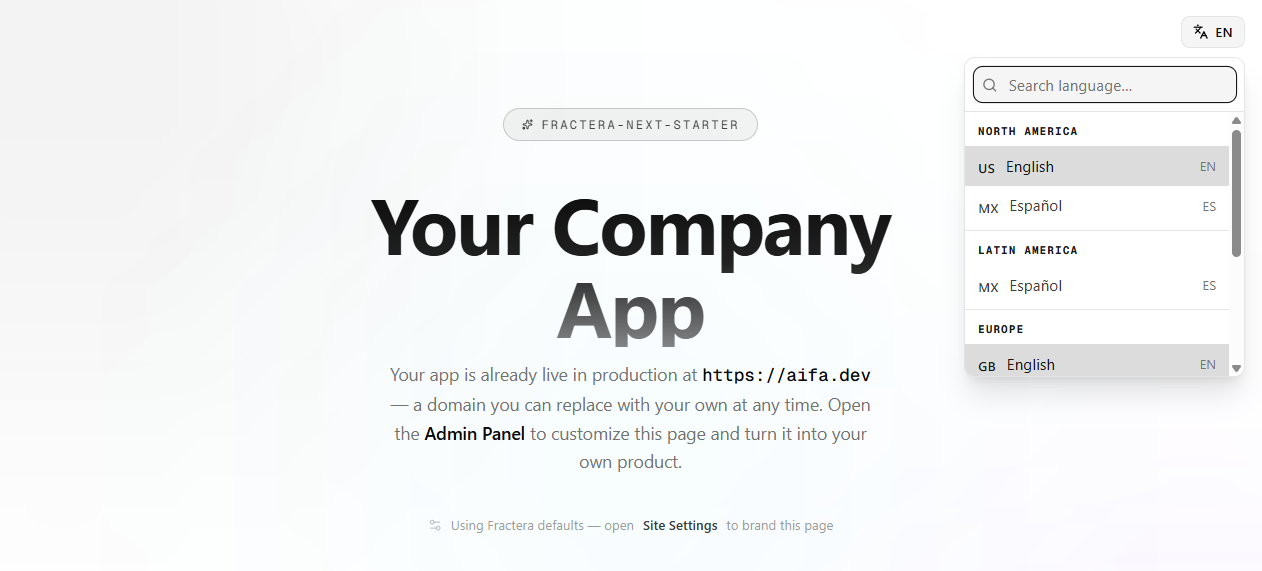
Where the button lives is up to you — a header or a footer are the natural homes; mount it wherever fits your design. And if you want a single-language app, just leave one language in the environment variable — its standard ISO code, e.g. `en` — and set it as the default. The button hides itself and every page serves from the bare root, no prefix.
A personal word. Back in 2016, building multilingual Web and PWA apps became a real business direction for me. I found a niche making menus for restaurants — and that grew into two businesses I brought here through COVID. My project then was maps.menu, and what opened that market for me was exactly the multilingual version: my edge became building multilingual menus for restaurants, barbershops and other tourist spots on the island of Tenerife. Ever since, I pay unusual attention to multilingualism, because I know how much it matters for small business. So it is a real pleasure to solve one of the hardest problems for you — internationalization and localization. Good luck building your apps.
Roma ArmstrongFounder at Fractera.ai
Deploy your own AI-optimized, multilingual-ready workspace today — choose your framework and get started.
Deploy with AIFrequently asked questions
- What changed in how Fractera publishes multilingual content?
- Content moved from one growing file per type (with an all-or-nothing language switch) to one folder per document: a full English base file, plus a partial override file per extra language. A missing field falls back to English per key, so a new language can ship with a single translated field. Page code no longer carries hardcoded language branches, and a lint rule prevents them from returning.
- What is the create-multilingual-content-entry skill?
- It is an agent skill shipped as part of the starter's standard architecture. Any AI agent in the project can use it to create a multilingual document correctly — the per-document folder, the full base language, partial per-language overrides, the registry entry, and a check for the absence of language hacks. It is self-sufficient: it works even if the project runs a single agent with no Hermes and no memory.
- Why is multilingual content tied to SEO for both Google and AI?
- Because optimizing a site for people and making it findable are now the same job. Each language gets its own URL with hreflang and its own search surface (title, description, keywords) written from its own angle, so engines see distinct pages, not a duplicate. In parallel, every update is reflected in machine-readable indexes (llms.txt, llms-full.txt) so AI crawlers and agents can discover it — generative engine optimization as a first-class channel.
- Do I have to translate everything before publishing a new language?
- No — that is the core of the change. Translation is now per key with English fallback, so you can publish a language with just one translated field and fill in the rest over time. Priority languages get a full translation; the long tail exists, correct, in base-fallback mode until someone completes it.